 Private Solutions
DeadshotIO
Your setup guide. About 5 minutes from here to in-game. Have your license key ready — it starts with DSIO1. and is one long line of text.
Windows app
No Tampermonkey
Works offline
1 Check what you need
- 64-bit Windows (10 or 11).
- Google Chrome installed. Get it here if you don't have it.
- An internet connection for the game, and your license key.
Macs, phones and other browsers are not supported. You don't need Python.
2 Download and extract
- Download DeadshotIO
- Right-click the ZIP and choose Extract All.
- Open the extracted folder. Always run the app from this folder, not from inside the ZIP.
Keep the files together.
verification-public.pem must stay next to DeadshotIO.exe.If an older Deadshot script is installed in Tampermonkey, turn it off first so two copies don't run at once.
3 Activate your key
- Double-click
DeadshotIO.exe. - Paste your full key into the License key box and click Activate license. Got a license file instead? Click Import license file.
- The app shows your license as valid. You only do this once.
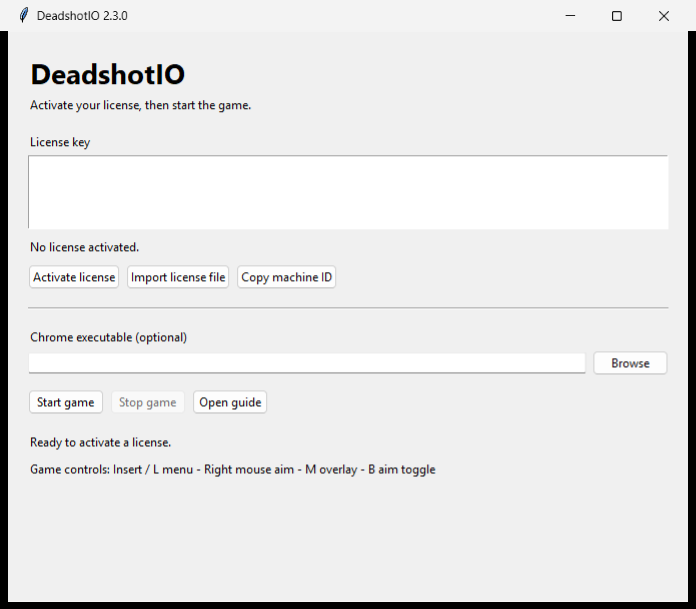
Key for one PC only? If we asked for your machine ID, click Copy machine ID and send us the value. We'll make a key that works on your computer.
4 Start the game
- Leave Chrome executable blank. The app finds Chrome by itself. If it can't, click Browse and pick
chrome.exe. - Click Start game. A separate Chrome window opens with Deadshot. This window is its own profile, so your normal Chrome is untouched.
- Join a match, pick your class if asked, and spawn.
- Click inside the game so it captures your mouse.
5 Play
Press Insert or L to open the menu, and press it again to close it before you aim. Your settings save automatically.
| Insert / L | Open or close the menu |
| M | Player overlay on or off |
| B | Aim on or off |
| N | Snaplines on or off |
| Right mouse | Hold to aim (default) |
In the menu:
- Aim at — head, neck, body, or whichever point is nearest your crosshair.
- FOV radius — the circle where aim can pick a target.
- Smoothing — 1 is fastest, 10 is the smoothest pull.
- Activate — Hold aim key, or Always to aim without holding anything.
- Aim key — pick another key or mouse button. Esc cancels.
- Player names and Health bars — tick them to show them on the overlay.
- No recoil — under Aim, off by default. Tick it to remove your own firing kick.
The overlay shows enemies only. It skips teammates and anyone whose team can't be worked out. In free-for-all, every other player counts as an enemy.
Good to know
- Next time just open
DeadshotIO.exeand click Start game. Your key and settings are remembered. - Your key's time starts when we make it, not when you first use it.
- Keys are checked on your PC, so there's no login. Make sure your Windows date and time are correct.
- Click Stop game in the app when you're done. Your normal Chrome windows can stay open.
- Keep your key private. If a game update breaks something, we'll send you a new build.
Problems?
| "License rejected" | Copy the whole key again, or import the license file. Check your Windows date and time. An expired key needs renewing. |
| "Assigned to another computer" | Your key was made for a different PC. Click Copy machine ID, send it to us, and we'll make one for this PC. |
| Chrome not found | Install Google Chrome, or click Browse and choose chrome.exe. |
| The app or a file won't open | Extract the whole ZIP first. Don't run it from inside the ZIP or mix files from different versions. |
| No boxes or names | Join and spawn first. Press M, then open the menu and tick Boxes and Player names. |
| Aim doesn't move | Press B to turn aim on. Close the menu, click inside the game, hold right mouse, and keep an enemy inside the FOV circle. If an old copy is running, stop it and start again. |
| No recoil is greyed out | A game update changed things. Ask us for the latest build. Everything else still works. |
Still stuck? Message us with a screenshot and we'll sort it out.